
Turn Sales Navigator Signals Into Pipeline
Pype turns Sales Navigator searches and usage into a consistent pipeline habit, fully managed.
Find the right people, prioritize accounts & know what to say to book meetings.

The Insight Is Only the Start
Sales Navigator helps sellers find decision makers, map accounts, monitor job changes, and see shared connections.
But finding the right person is not the same as creating pipeline.
Sellers still need to answer:
Which accounts should I focus on this week?
Who else should I contact at the account?
How do I reach them beyond LinkedIn?
What should I say?
How do I follow up long enough to create a meeting?
Without a clear process, Sales Navigator becomes a better search tool, not a reliable source of pipeline.
Sales Navigator helps sellers find people.
Pype helps them turn those people into pipeline.
Is Sales Navigator Producing Pipeline Consistently?
Assigned seats and occasional logins do not prove adoption. Can your team answer these questions with confidence?
Consistent Usage
Are sellers using Sales Navigator every week or only when reminded?
Repeatable Workflows
After saving accounts and leads, or mapping buying committees, do they have a unified process to turn that into pipeline?
Shared Priorities
Does everyone know which accounts, buyers, and signals matter most?
Complete Contact Data
Can sellers move from the right buyer to verified contact records?
Relevant Outreach
Do sellers know what to say or does every message start from scratch?
Pipeline Visibility
Can you connect Sales Navigator activity to meetings, opportunities, and pipeline for everyone who has a license?
At Renewal, Can You Defend Every Seat?
Can you show evidence of seller adoption, consistent execution, and pipeline impact?
If not, the problem may not be Sales Navigator. It may be the execution system around it.
Finding a person is only the first step.
A seller may find a new VP, see a job change, or spot a relevant connection. They still need to decide if the account is worth pursuing, identify the right people, find a reliable way to reach them, write a relevant message, and follow up.
That is where good research often turns into an open tab instead of a real sales play.
What Sales Navigator insight Give You
Relevant companies and decision makers
Job changes, company updates, and mutual connections
People inside an account
LinkedIn profiles and InMail access
Saved searches and alerts
What Pype Turns That Into
Focus on the accounts most worth working now
Understand why the account matters right now
Map the right people across the buying committee
Find practical ways to reach people and start conversations
Build a plan and work it consistently
Pype closes the gap between “I found the right person” and “I know what to do next.”
A clear path from insight to action.
Sales Navigator intelligence
Sales Navigator shows sellers people, account structure, job changes, shared connections, and professional context.
Signal density
Pype combines that information with account fit, buying signals, relationship context, and other evidence to show where the strongest opportunities are.
Priority accounts
Sellers get a focused list of accounts to work now, instead of an endless list of searches and saved leads.
The right people
Pype helps sellers identify the people who matter across the buying committee.
Ways to reach them
Sellers have LinkedIn profile URLs, verified email addresses, and other practical contact information.
Relevant outreach
Sellers know what to say, why they are reaching out, and what to do next.
Consistent action
Coaching, office hours, and accountability help sellers work the plan week after week.
Pipeline
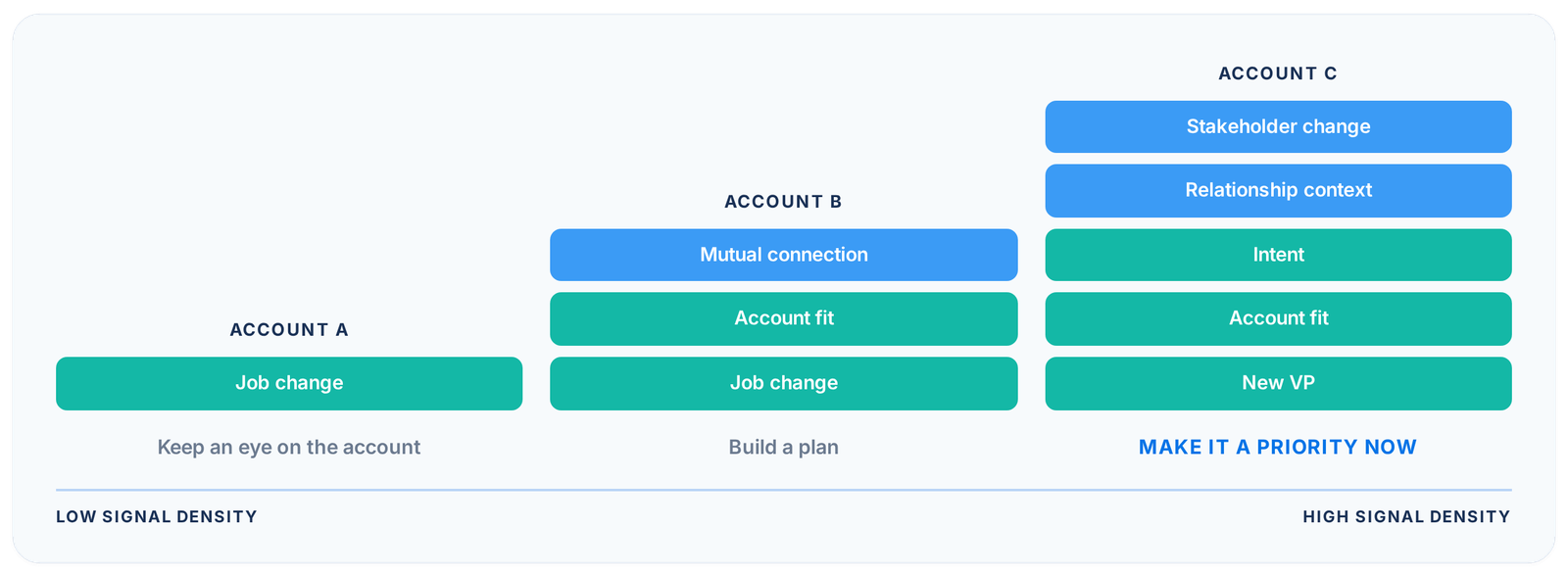
A job change can be interesting. Multiple signals make it worth acting on.
Not every new connection, profile view, job change, or account update deserves immediate seller attention.
Pype helps your team combine Sales Navigator information with account fit, intent, stakeholder changes, relationship context, and other useful data. Sellers can see where the evidence is strong enough to act.
Low signal density:
Keep an eye on the account
Growing signal density:
Build a plan
High signal density:
Make it a priority now
Less searching. Less noise. More focus on the accounts most likely to create pipeline.
This is not another Sales Navigator training or tutorial program
Pype does not replace Sales Navigator. It helps your sellers get more from it.
Sales Navigator gives your team powerful information about people and accounts. Pype gives them a practical way to use that information every week.
Clear priorities
Sellers know which accounts to work first
The right people
Sellers know who should be part of the conversation
Contact information
Sellers have real ways to reach those people
Relevant messages
Sellers have a strong reason to start a conversation
Consistent follow through
Sellers have coaching and accountability to keep going
Sales Navigator gives your team the information. Pype gives them the system.
Sales Navigator is highly valued by strong users, but many teams use it only for basic searches or occasional profile views. The goal is not simply to increase logins. The goal is to help sellers use the information to create meetings and pipeline.
Information only creates value when seller behavior changes.
Pype gives your team a practical system for turning Sales Navigator into self-generated pipeline.
Step 1
Process & Blueprint
Sellers learn how to choose the right accounts, understand the people inside them, and create outreach that earns attention.
Step 2
Enablement
Each seller gets a clear plan that includes priority accounts, the right people to contact, useful contact information, LinkedIn profile URLs, and outreach direction.
Step 3
Reinforcement & Accountability
Pype creates a regular rhythm for execution through protected prospecting time, daily office hours, and regular check ins on account focus and follow through.
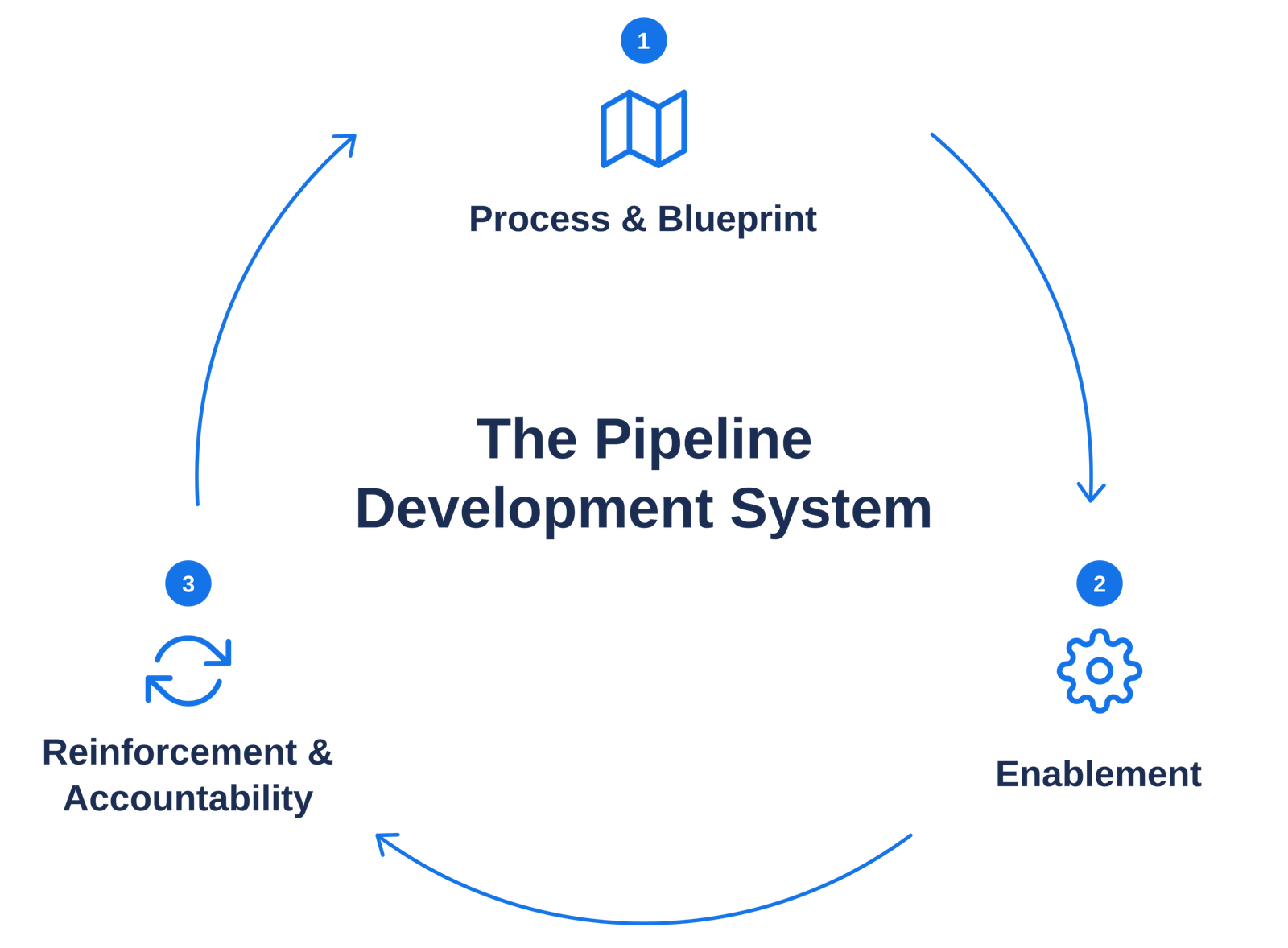
Pype is the SOP for self generated pipeline. It gives your sellers a clear process, the tools to run it, and the accountability to make it stick.
The Quarterly Sprint
People change jobs. Accounts change priorities. Your sellers need a plan that stays current.
Pype runs on a repeating quarterly cycle that keeps the team focused on the right accounts.
|
Phase |
What happens |
|---|---|
|
Week 1: Learn & Launch |
Sellers receive a fresh account plan, buying-committee context, contact paths, and outreach direction |
|
Weeks 2–12: Execute |
Sellers work priority accounts with relevant follow-up, coaching, and support |
|
Week 6: Checkpoint |
The team reviews account focus and makes adjustments while keeping the work moving |
|
Week 12: Review & Reset |
The team reviews progress, refreshes priorities, and starts the next cycle stronger |
Amplify Your Sales Navigator Investment
You’ve likely invested a sizeable chunk into LinkedIn Sales Navigator. Pype brings the investment to life with proven pipeline growth, not just through activating the account, saving leads or setting up your preferences.
We bring the pipeline development workflow to life.